Broadcaster guide: from application to first payout.
Everything you need to apply to broadcast on Vibecams: creating your account, verifying your identity, preparing your setup, how token tips and private shows pay, and how payouts are processed.
Applications are open now. Broadcasting, token purchases, tips and private shows begin at launch. Approval lets you finish your setup early; it does not open broadcasting before launch.
Screenshots on this page are demonstrations from a local test environment with synthetic accounts. They contain no real broadcaster, member or identity information. Your dashboard may look slightly different.
Create your broadcaster account
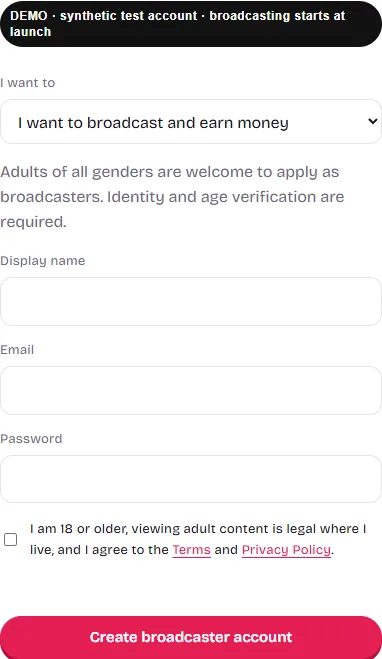
Open the broadcaster signup form. The account type is already set to broadcast. Enter:
- a display name members will see (do not use your legal name);
- an email address you can access, used for confirmation, approval and payout messages;
- a password, and confirmation that you are 18 or older and accept the Terms and Privacy Policy.
You do not upload any identity document on the signup form. Verification happens later, inside your dashboard, after your email is confirmed.
Confirm your email
After signing up, we email you a confirmation link. Open it from the same address you registered with. Identity verification cannot be submitted until your email is confirmed. If the message does not arrive within a few minutes, check spam or promotions folders, then press Send again on the reminder bar shown while you are signed in.
Verify your identity and age
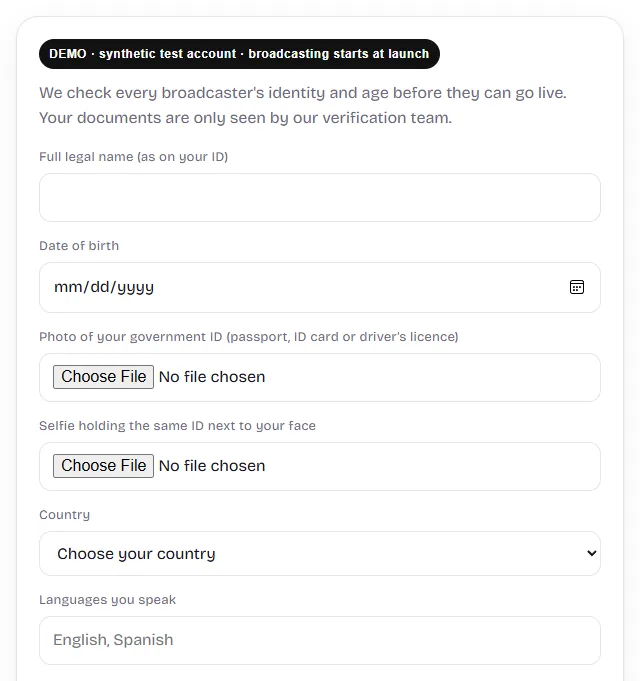
Every broadcaster is checked by our team before approval. In your dashboard, provide:
- your full legal name exactly as it appears on your ID, and your date of birth;
- a clear photo of a valid government photo ID (passport, national ID card or driver's licence);
- a selfie holding that same ID next to your face;
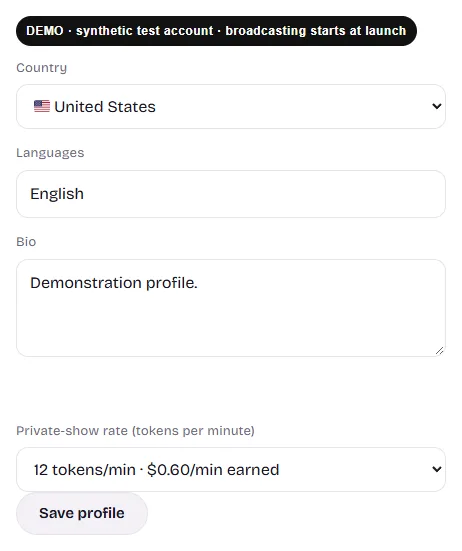
- your country, the languages you speak, a short public bio and any other names you have used.
You must be at least 18 and the age of majority where you live. Your legal name, ID and email are not shown to members; members see your display name, country, languages and bio. Identity records are kept as required by law, including 18 U.S.C. § 2257. Read the Privacy Policy before uploading documents.
Applications are reviewed by hand. You receive an email when you are approved, or a reason if documents could not be verified, and you can submit again. Anyone else who appears on camera with you needs their own verified broadcaster account.
Sign the broadcaster agreement
Below the verification fields you will see a summary of the agreement. Read it together with the full Broadcaster Contractor Agreement, tick the consent box and sign by typing your full legal name. Key points:
- You are an independent contractor. You choose when to go online, which private requests to accept, and what you are comfortable sharing, within the site rules. You can end a broadcast or private show at any time.
- No one else may appear on camera unless they have their own verified account. Prohibited content listed in the Terms is never allowed.
- You may not record members, share their information or ask for payment outside the platform.
- You are responsible for your own taxes. A tax form may be requested before your first payout.
Prepare your equipment and profile
Equipment
- Camera and microphone: a laptop webcam, external webcam or a recent phone works. Allow camera and microphone access for vibecamslive.com in your browser.
- Browser: a recent version of Chrome, Safari, Firefox or Edge. Close other apps that use the camera, such as Zoom or Teams.
- Connection: a stable connection matters more than speed. Wi-Fi is usually more reliable than mobile data; stay close to your router.
- Lighting and sound: face a window or soft light, avoid a bright light behind you, and choose a quiet space.
- Privacy: check what is visible behind you. Remove mail, documents, photos or anything that shows your location. Recording is prohibited, but external screen recording cannot be prevented.
Profile, hours and private rate
Once approved, your dashboard lets you update your country, languages and bio, set your usual weekly hours (with an optional reminder email before they start), and choose your private-show rate. Choose from 8, 12, 18, 30, 60, 90 or 120 tokens per minute; the default is 12. A new rate applies to future private shows only.
How tips and private shows pay
Members use one token wallet for public tips and private shows. You earn $0.05 for every token tipped to you in a public room and $0.05 for every token billed in your private shows. Public viewing time on its own is unpaid, and earnings depend on member activity. Traffic, tips, private requests and income are not guaranteed.
Public room tips
In your live room, signed-in members with a confirmed email can chat and send voluntary tips of whole tokens. You can set a tip goal for the room. A 100-token tip adds $5.00 to your balance.
Private shows
Members can request a private show from your room, which you accept or decline, or reach you through instant matching. In instant matching, members choose a maximum tokens-per-minute rate and are only paired with broadcasters at or below it. When a room request is accepted, your public stream closes before the private show starts.
Each private show locks your rate when it starts. The billing clock starts when both browsers report connected video, or 10 seconds after the first browser reports it if the other has not reported. A 5-second grace period follows. If neither browser reports connected video within 30 seconds, the show ends without a charge. Time is counted by the second, and the show's running total is rounded up to a whole token. You earn on every billed token. If you skip or leave a show within its first 30 seconds, the member's tokens are refunded and that show does not earn.
| Your rate | Per billed minute | 10 billed minutes | 60 billed minutes |
|---|---|---|---|
| 8 tokens/min | $0.40 | $4.00 | $24.00 |
| 12 tokens/min (default) | $0.60 | $6.00 | $36.00 |
| 18 tokens/min | $0.90 | $9.00 | $54.00 |
| 30 tokens/min | $1.50 | $15.00 | $90.00 |
| 60 tokens/min | $3.00 | $30.00 | $180.00 |
| 90 tokens/min | $4.50 | $45.00 | $270.00 |
| 120 tokens/min | $6.00 | $60.00 | $360.00 |
These are arithmetic examples of billed private time, not forecasts. An hour online is not an hour of billed private time. A higher rate earns more per minute but costs members more, which can affect how often you are requested.
Invite other broadcasters
Once you are approved, your dashboard shows a personal invite link. When a broadcaster who signs up through your link has earned $50 in total from tips and private shows, $10 is added to your payout balance, once for each broadcaster you invite. You must still be approved and in good standing at that point. Referral bonuses never count toward anyone's $50. These amounts can change; your dashboard always shows the current ones.
Member prices are different from your earnings. Members buy tokens in one-time packs (100 for $9.99, 550 for $49.99, 1,150 for $99.99), which works out to about 8.7–10.0 cents per token. Broadcasters receive $0.05 per tipped or billed token; Vibecams keeps the difference to operate the platform. Some members may hold promotional private-show-only tokens: these can pay for private time (and you earn on them like any billed token) but cannot be used for public tips. See token prices and examples for how members are charged.
How payouts are processed
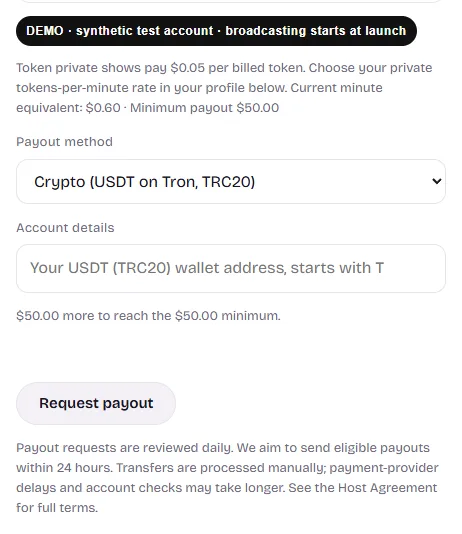
- Minimum: request a payout from your dashboard once your available balance reaches $50.
- Methods: USDT (TRC20), Paxum and bank transfer are listed. Availability and fees depend on your country and provider; confirm the method works for you before you rely on it.
- Review: payout requests are reviewed daily, with a target of sending eligible payouts within 24 hours.
- Manual transfers: payouts are sent manually, not automatically. Provider delays, verification or account checks can take longer, and the agreement allows up to 14 days. Same-day receipt is not guaranteed.
- Taxes: as an independent contractor you handle your own taxes; a tax form may be requested before your first payout.
Before launch checklist
- Account created and email confirmed.
- Verification and broadcaster agreement submitted, and approval email received.
- Profile country, languages and bio completed with no personal details.
- Private rate chosen and usual hours saved, with reminders turned on if you want them.
- Payout method and its fees in your country confirmed.
- Camera, microphone, lighting and background tested in your browser.
Broadcasting, tips and private shows open at launch. Check your dashboard for availability.
Questions
Do I need followers or experience?
No following is required to apply. Audience size depends on member activity, your schedule and how you present your room.
Do I have to do adult content?
No. You choose what you share in your room and private shows, within the site rules, and you can decline requests or end a session at any time.
Can I start broadcasting today?
Not yet. Applications are open; broadcasting, purchases and private shows begin at launch.
Further reading: how to become a cam model · getting paid with USDT, Paxum or bank transfer.
More answers in the broadcaster help center. Full terms: Broadcaster Contractor Agreement.